


Showing posts with label LEARNING. Show all posts
How to Turn Off Beeping Sound Notifications in Facebook
How to Turn Off Beeping Sound Notifications in Facebook

Facebook has recently added another good beeping feature for notifying user who is not actually viewing the Facebook screen, so if you are using another website at the same time using facebook and if anyone likes or comments or do any kind of activity you are going to get a beep sound that will notify you that someone has done something on facebook.
 So
now if you think that feature is not good and you just need to get rid
of that beep sound well now you can by following below easy steps.
So
now if you think that feature is not good and you just need to get rid
of that beep sound well now you can by following below easy steps.- Visit Facebook.com
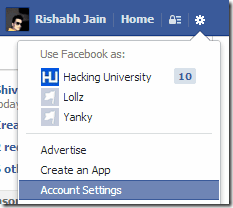
- Click on the small gear icon on top right.
- Now just choose Account Settings.
- Now you will be taken to the account settings page, just choose Notifications Head.
- Now under On Facebook option you need to un check that sound beep notification option.

- Now click on Save Changes button and enjoy, now no sound would ever disturb you on Facebook, now anytime you want to get it enabled just check mark that option :)
Tag :
LEARNING,
download youtube videos with and without software and convert to mp3
without software
Add pwn before url of youtubeand download the format you want...
example:>
this is url you are watching
https://www.youtube.com/watch?v=b2Ql_Ie2GAo
for download add pwn like this
https://www.pwnyoutube.com/watch?v=b2Ql_Ie2GAo
with software
How To Convert YouTube Videos Into Mp3 Audio
There may be instances in your life, while you search for a song in the internet (mp3) and fail to get it and at last found its video in YouTube
or any similar sites.. so what will you do if you need only the
mp3(audio) instead of video. Most of them download the song(video) using
some YouTube downloaders and use some applications to convert it into mp3. These all need some time and consume your internet usage
a lot. And it’s a tedious job. You may fail to get the output iff there
is any error in your internet connection. But today I am with a simple
trick with which you can convert your YouTube videos into mp3
online,without any software. Only you need is the url of the YouTube
video. That’s all. Scroll down and enjoy the trick…..
Go to video2mp3.net

In this field insert the url of the video

In this field insert the url of the video
 Click on ‘convert’
Then you will be taken to this page. When popup appear allow java applet

Then your download will start within no time
Browser addons for firefox,chrome and safari are also available so that you can do this conversion at a click

Go to video2mp3.net
In this field insert the url of the video
In this field insert the url of the video
Then you will be taken to this page. When popup appear allow java applet
Then your download will start within no time
Browser addons for firefox,chrome and safari are also available so that you can do this conversion at a click
Clcik HERE to get addons of video2mp3 for firefox, chrome and safari
or
Secret Hack Codes for iPhone 4 or 4S
Secret Hack Codes for iPhone 4 or 4S
Hello friends, today i am going to share all the available secret hack codes for iPhone 4 or iPhone 4S. These secret hack codes will help you to hack the iPhone and helps you to explore the internal settings of your iPhone.
Secret codes are actually those codes which are not known(hidden)
to general users, usually Geeks use these codes as their shortcuts to
browse the internal settings and perform their exploits. As we all know
iPhone is quite secured and there are very less hack codes available for the same but don't worry Guys i come up with all the available hacking codes that works on iPhone 4 or 4S. You can also try these hack codes on previous models as i have tested them only of iPhone 4 and iPhone 4S. Some of them works on iPhone 4 and some on iPhone 4S
and some are specific to operator. So please don't complain if any of
them didn't work for you.. All codes are tested personally and are 100%
working..
Note: Some of codes will require tapping of call key on your iPhone, actually most of them require call button + tap(means slide it). So if any code doesn't work just by dialing, you just need to tap the call key and it will work. Infact except the IMEI number one hack code all require call + tap.
Secret Hack Codes for iPhone 4 or iPhone 4S
*#43#
Use to verify if call waiting is enabled
*#61#
Verify the number for unanswered calls
*#62#
Verify the number for call forwarding if no service is available.
*#67#
Verify the number for call forwarding if phone is busy
*#33#
To verify whether barring is enabled or disabled for outgoing
*#21#
To display the settings for your call forwarding
*3001#12345#*
Enters Field mode which allows you to access most of the hidden settings and functions of your iPhone.
*#06#
Display the IMEI of your iPhone, as always this is the standard code for all brands of phones.
*225#
Displays the account balance for postpaid contracts.
*777#
Displays the account balance for prepaid accounts.
*646#
Displays the remaining minutes available.
*3282#
Get your data usage information.
*729
Options to make payments. Its operator specific.
611
Dials customer service, (114 in RSA for Vodacom). Its operator specific.
*#30#
This shows whether you have enabled or disabled the presentation of the calling line, presumably the number of the party placing the call.
*#76#
State whether the connected line presentation is enabled or disabled. Similar to the calling line presentation
PARAGON BACKUP AND RECOVERY

Never Lose A File Again With Paragon Backup And Recovery Home 14
We all know why we need to back up. If you use your computer as much as I do, then you’re constantly creating, modifying and collating new files; your hard drive swelling by the minute. Ensuring that your backups are current and comprehensive is an arduous job, often complicated by the fact that most people have small hard drives on their machines.
Thankfully, some products aim to ease this task. One of them is Backup and Recovery Home 14, by German software titan Paragon. The tool runs on Windows 2000 through Windows 8.1 and offers an comprehensive approach, from backing up your files to your entire system. Earlier versions have received glowing reviews, and the latest version impresses with a number of killer backup and restore utilities for the low price of $40.
Installing it was as simple as installing any Windows application, although I was prompted to install a couple of dependencies at the start. After 10 minutes, Paragon Backup and Recovery 14 was sitting pretty on my hard drive.

Drive Monitoring
Although not advertised in the name, Paragon Backup and Recovery can check the file system for imperfections and flaws. This is handy, as it gives you a heads-up as to if your HDD / SSD is on the fritz, effectively warning you of impending data loss.
This required a restart, upon which my computer booted up into a slightly scary looking program. This informed me of the progress of the scans I was running, as well as if there were any issues with my drive (there weren’t). One slight complaint was that the estimated time of completion wasn’t accurate. It said that each scan would take around 30 minutes, but took significantly longer, resulting in me eventually leaving my computer running overnight and going to bed.

Backup
One of the main features advertised by Paragon is the ability to back up files, folders and your entire hard drive. In addition, you can also back up emails retained locally on your computer. I decided to create a backup archive of my Documents folder. This was a relatively simple process; I selected the type of backup required, the folder I wanted to back up and the place where I wished to store my backup.

The process of creating a backup was a little bit slow, given that I was running a SSD in peak health and given that my Windows computer isn’t my main machine, the Documents folder isn’t especially full. Despite this, the backup was created accurately, and was restored with a minimum of fuss. Which brings us onto our next point – restorations.
Restoration
Once I created my archive, I decided to restore it. This was stored in a pre-defined location in my Documents folder, and when I visited it with the file explorer, I was unable to directly open it.Instead, I had to open it with Paragon. Restoring backups was a simple, relatively quick process (especially in comparison to creating the initial backup). It uses a wizard, which presents each archive chronologically in a list, and you are able to select which one you wish to restore. You can also decide what files and folders you wish to restore.

Conclusion
I really like Paragon Backup and Recovery Home 14.Sure, it has its fair share of warts, including some incomprehensible design choices and inaccurate ETAs. But it does handle backing up and restoring files perfectly, and for that it ought to be commended.
Give it a go and let me know how you find it in the comments below!
What is MD5 Hash and How to Use it
What is MD5 Hash and How to Use it
 In this post, I will discuss about one of the interesting cryptographic algorithm called MD5 in a very simple and easy to follow manner. In addition to understanding what is MD5 hash, you will also learn how to make use of this algorithm in your daily life.
What is MD5 algorithm?
MD5 which stands for Message Digest algorithm 5
is a widely used cryptographic hash function that was invented by
Ronald Rivest in 1991. The idea behind this algorithm is to take up a
random data (text or binary)
as an input and generate a fixed size “hash value” as the output. The
input data can be of any size or length, but the output “hash value”
size is always fixed. Here is an example of MD5 Hash function at work:

As you can see from the above example,
whatever the input size you give, the algorithm generates a fixed size
(32 digit hex) MD5 hash. You can even try this on your own using the MD5 hash generator tool here.
Applications of MD5 Hash:
Before I tell you about how to use MD5, I
would like to share one of my recent experience which made me start
using MD5 algorithm.
Recently I made some significant changes
and updates to my website and as obvious, I generated a complete backup
of the site on my server. I downloaded this backup onto my PC and
deleted the original one on the server. But after a few days something
went wrong and I wanted to restore the backup that I downloaded. When I
tried to restore the backup, I was shocked! The backup file that I used
to restore was corrupted.
That means, the backup file that I
downloaded onto my PC wasn’t exactly the one that was on my server. The
reason is that there occurred some data loss during the download
process. Yes, this data loss can happen often when a file is downloaded
from the Internet. The file can be corrupted due to any of the following
reasons:
- Data loss during the download process, due to instability in the Internet connection/server.
- The file can be tampered due to virus infections or
- Due to Hacker attacks.
So, whenever you download any valuable
data from the Internet, it is completely necessary that you check the
integrity of the downloaded file. That is, you need to ensure that the
downloaded file is exactly the same as that of the original one. In this
scenario, the MD5 hash can become handy. All you have to do is generate
MD5 hash (or MD5 check-sum) for the intended file on your server.
After you download the file onto your
PC, again generate MD5 hash for the downloaded file. Compare these two
hashes and if they match, that means the file is downloaded perfectly
without any data loss.
A MD5 hash is nothing but a 32 digit hexadecimal number which can be something as follows:
A Sample MD5 Hash
e4d909c290d0fb1ca068ffaddf22cbd0
This hash is unique for every file
irrespective of its size and type. For example, two different executable
files (.exe files) with the same size will not have the same MD5 hash
even though they are of same type and size. So MD5 hash can be used to
uniquely identify a file. The same thing applies even for messages where
each message that was sent and received can be verified using the MD5
hash.
How to use MD5 Hash to check the Integrity of Files?
Suppose you have a file called backup.tar on your server. Before you download, you need to generate MD5 hash for this file on your server. To do so use the following command:For UNIX:
md5sum backup.tar
When you hit ENTER you’ll see something as follows:
e4d909c290d0fb1ca068ffaddf22cbd0
This is the MD5 hash for the file backup.tar.
After you download this file onto your PC, you can cross check its
integrity by again re-generating MD5 hash for the downloaded file. If
both the hash matches then it means that the file is perfect. Otherwise
it means that the file is corrupt. To generate the MD5 hash for the
downloaded file on your Windows PC use the following freeware tool:
I hope you like this post. For further doubts and clarifications, please pass your comments. Cheers!
